
Aanchal Parmar
Product Marketing Manager, Flexprice
PostHog is free for the vast majority of teams, then charges usage-based rates per product, starting at $0.0000500 per analytics event after the first 1M free events each month.
It's an all-in-one product analytics and experimentation platform for engineering-led teams, combining analytics, session replay, feature flags, experiments, surveys, a data warehouse, error tracking, and newer AI tooling in one stack.
Every product meters independently, each with its own free monthly quota and its own price ladder, so you only pay for the modules you actually use.
Key takeaways
PostHog says 97% of companies stay on the free tier. You only pay once a product crosses its monthly free quota, and quotas reset on the first of each month.
Pricing is per product and metered independently: analytics per event, session replay per recording, feature flags per request, and so on. Each meter uses step-down rates that drop as your volume grows.
The two plans are Free (1 project, 1-year data retention) and Pay-as-you-go (6 projects, 7-year retention). Both include unlimited team members and no per-seat fees.
Analytics events and session replays drive most bills. Surveys, feature flags, and warehouse rows usually stay small unless you scale them hard.
Per-product billing limits cap spend on any single module, so one runaway meter can't blow up your whole bill.
The Core structure of PostHog’s pricing
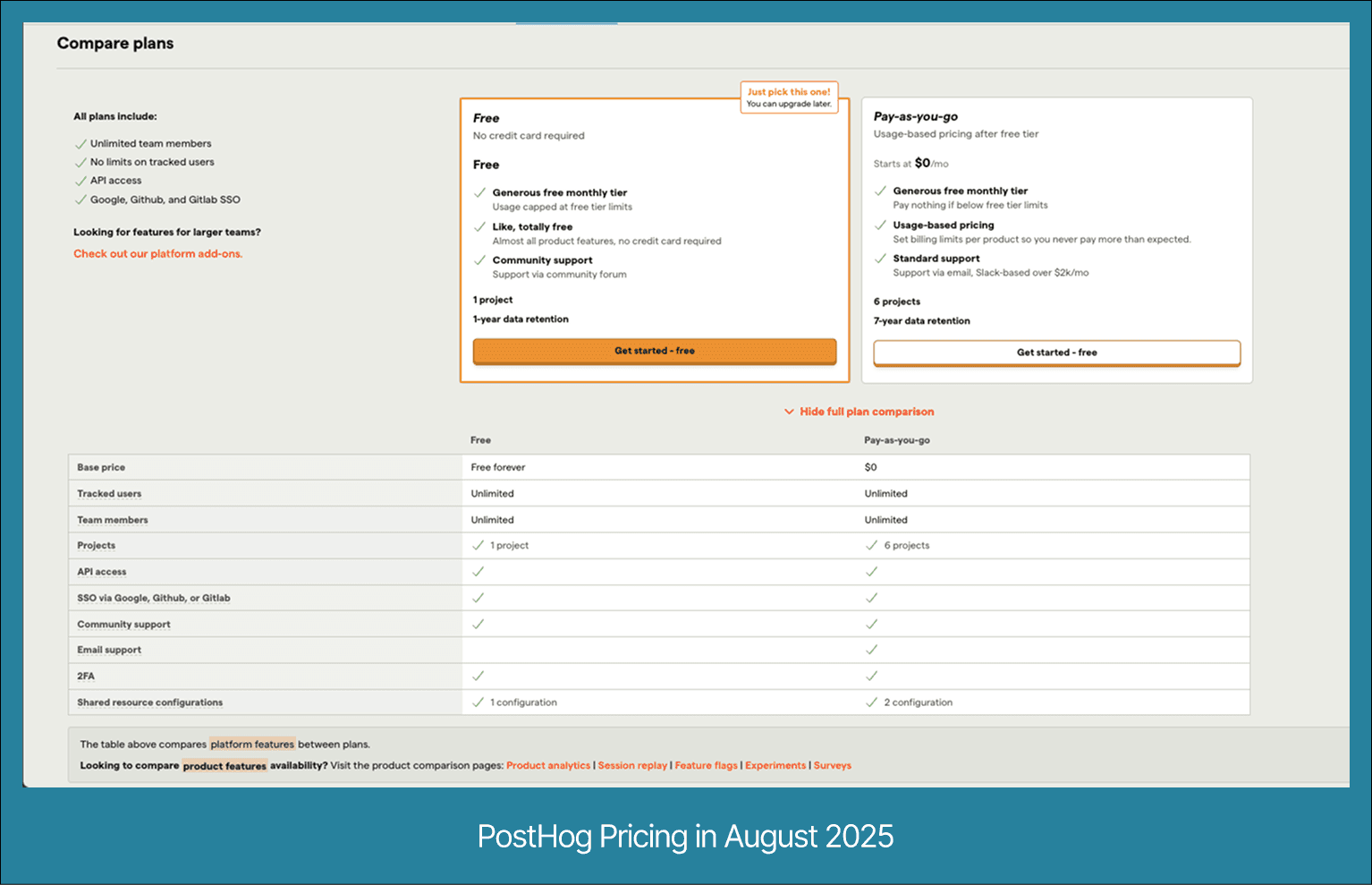
PostHog's pricing lets teams start free, scale gradually, and pay only for the products and volumes they use. The framework is consistent across every module, but the bill you see depends heavily on your usage patterns. Four rules shape how it works.
Free monthly quota for each product
Every module comes with its own free monthly allowance, and that allowance is the same whether or not you have a card on file.
Analytics, session replay, feature flags (with experiments), surveys, the data warehouse, error tracking, and the newer AI and logging products each carry a separate free quota that resets on the first of each month.
That setup lets you run several products for testing without committing to paid usage. Your first 1M analytics events, 5,000 replay recordings, and 1M feature flag requests in a month are all free, no matter what else you pay for. Enable a product only for occasional testing, and you might never cross its free limit.
Usage-based billing after the free tier
Once you pass a product's free quota, PostHog charges for every additional unit that month. It uses step-down rates, which means the per-unit price drops as you move into higher usage brackets.
Send 12M analytics events in a month and the math runs like this: 1M events are free, the next 1M bill at $0.0000500 each ($50.00), and the remaining 10M bill at $0.0000343 each ($343.00), for a total of $393.00.
The same pattern applies to every other product, just with different unit types (recordings, requests, responses, rows, exceptions) and different price ladders.
No per-seat fees
PostHog includes unlimited seats and tracked users on every plan, so headcount never changes your bill.
Unlike tools that charge for each team member or tracked user, PostHog ties cost to usage alone.
A 5-person startup and a 50-person product org pay the same for 2M analytics events, because the bill depends on events, not people.
That removes the "seat creep" cost that grows as teams expand.
Per-product billing limits
You can set a hard monthly spend cap on each product, and PostHog stops processing that product's usage once you hit it.
Set a $200 monthly limit on session replay, cross it halfway through the month, and recordings stop until the next cycle while analytics, surveys, and everything else keep running.
Each meter caps on its own, so one product can't drain your budget and take the rest down with it.
What you get for free
Every PostHog product ships with a fixed monthly free quota that resets at the start of each billing cycle.
These allowances are identical on the Free plan and the paid plan, and paid usage in one product never touches your free quota in another.
Here are the current free monthly allowances by product:
Analytics: 1,000,000 events
Session Replay: 5,000 recordings
Feature Flags (with Experiments): 1,000,000 requests
Surveys: 1,500 responses
Managed Warehouse: 1,000,000 rows synced, plus free historical sync
Error Tracking: 100,000 exceptions
Data Pipelines: 10,000 events plus 1,000,000 rows
AI Observability (LLM analytics): 100,000 events
PostHog AI: 500 credits (about $5)
Logs: 10 GB ingested
Workflows: 10,000 messages per channel
The last five products are newer additions, so an older PostHog cost estimate that lists only six meters is now out of date.
You can confirm the current numbers on PostHog's pricing page, which PostHog updates as it ships products.
The last five products are newer additions, so an older PostHog cost estimate that lists only six meters is now out of date.
You can confirm the current numbers on PostHog's pricing page, which PostHog updates as it ships products.
Usage-based tiers by product
Once you pass a product's free quota, PostHog charges per unit with step-down pricing: the more you use, the lower the per-unit cost at higher volumes. Each product has its own meter, rates, and thresholds. The tables below reflect published rates as of August 2026.
1. Analytics (per event)
Analytics bills per event, with the first 1M events free each month.
Monthly events | Price per event |
First 1M | Free |
1M to 2M | $0.0000500 |
2M to 15M | $0.0000343 |
15M to 50M | $0.0000295 |
50M to 100M | $0.0000218 |
100M to 250M | $0.0000150 |
250M+ | $0.0000090 |
Two optional analytics add-ons layer on top: group analytics (event data tied to a company or account) at $0.000071 per event, and data pipelines that forward events to your warehouse at $0.000062 per event.
Worked example, 12M events in a month: first 1M free, next 1M at $0.0000500 ($50.00), remaining 10M at $0.0000343 ($343.00). Total: $393.00.
One nuance the headline rate hides: PostHog charges an extra person profiles rate on events tied to identified users, on top of the base event rate.
It's free for the first 1M, then starts at $0.0001980 per identified event in the 1M to 2M tier and steps down from there.
The $393 example above assumes anonymous events, so traffic from identified users costs more than the base ladder alone suggests.
2. Session replay (per recording)
Session replay bills per recording, with the first 5,000 recordings free each month.
Web recordings | Price per recording |
First 5k | Free |
5k to 15k | $0.0050 |
15k to 50k | $0.0035 |
50k to 150k | $0.0020 |
150k to 500k | $0.0017 |
500k+ | $0.0015 |
Mobile replays run on a separate ladder, with the first 2,500 free:
Mobile recordings | Price per recording |
First 2.5k | Free |
2.5k to 15k | $0.0100 |
15k to 50k | $0.0070 |
50k to 150k | $0.0040 |
150k to 500k | $0.0034 |
500k+ | $0.0030 |
Worked example, 20k web replays: first 5k free, next 10k at $0.0050 ($50.00), remaining 5k at $0.0035 ($17.50). Total: $67.50.
3. Feature flags and experiments (per request)
Feature flags bill per request, with the first 1M requests free. Experiments run on top of feature flags, so they draw from the same request quota rather than a separate meter.
Monthly requests | Price per request |
First 1M | Free |
1M to 2M | $0.000100 |
2M to 10M | $0.000045 |
10M to 50M | $0.000025 |
50M+ | $0.000010 |
Worked example, 3M requests: first 1M free, next 1M at $0.000100 ($100.00), remaining 1M at $0.000045 ($45.00). Total: $145.00.
4. Surveys (per response)
Surveys bill per response, with the first 1,500 responses free each month.
Monthly responses | Price per response |
First 1.5k | Free |
1.5k to 2k | $0.100 |
2k to 10k | $0.035 |
10k to 20k | $0.015 |
20k+ | $0.010 |
Worked example, 2,500 responses: first 1,500 free, next 500 at $0.100 ($50.00), remaining 500 at $0.035 ($17.50). Total: $67.50.
Managed Warehouse (per row synced)
The data warehouse, now called Managed Warehouse and running on DuckDB, bills per row synced, with the first 1M rows free.
Monthly rows | Price per row |
First 1M | Free |
1M to 10M | $0.000015 |
10M to 25M | $0.000010 |
25M to 50M | $0.000008 |
50M to 100M | $0.000005 |
100M to 1B | $0.000002 |
1B+ | $0.000001 |
Worked example, 8M rows synced: first 1M free, remaining 7M at $0.000015. Total: $105.00.
Error tracking (per exception)
Error tracking bills per exception, with the first 100,000 exceptions free.
Monthly exceptions | Price per exception |
First 100k | Free |
100k to 325k | $0.000370 |
325k to 10M | $0.000140 |
10M+ | $0.000115 |
Worked example, 200k exceptions: first 100k free, remaining 100k at $0.000370. Total: $37.00.
The newer meters, AI, logs, and workflows
PostHog added several products in the last year, and each carries its own free quota and rate. These matter if you run AI features or route data and messages through PostHog:
PostHog AI (the natural-language data copilot): 500 credits free, then $0.01 per credit.
AI Observability / LLM analytics (usage, latency, and per-user cost for AI features): 100,000 events free, then per event on a step-down ladder that starts at $0.000350 and drops to $0.000060 at very high volume.
Logs (OpenTelemetry-compatible log ingestion): 10 GB free, then billed per GB (around $0.25/GB, dropping at higher volume).
Workflows (no-code automation and messaging): 10,000 messages per channel free, then per email or destination dispatch, with emails from about $0.003 and dispatches from about $0.00075, both stepping down at volume.
Data Pipelines (real-time destinations and batch exports): 10,000 trigger events plus 1M rows free, then per trigger event or row on their own ladders.
For most teams, the largest cost drivers are analytics events and session replays. Surveys, feature flags, warehouse rows, and the newer meters usually stay manageable unless a workflow pushes them hard.
Feature gating and bundling logic
PostHog's pricing avoids charging teams twice for interconnected features. Instead of billing every action separately, it bundles related products and applies relationship logic so dependent usage doesn't double up on your invoice.
No double-charging for dependent usage
When one feature triggers another under the hood, PostHog bills you once.
A feature flag evaluation might also generate an analytics event, but in PostHog's model you pay only for the flag request, not the associated event.
Without that rule, teams would pay twice for the same user interaction, once as a request and again as an event, which is common on platforms that meter everything separately with no relationship logic.
Experiments bundled under feature flags
Experiments run on feature flags, so PostHog has no separate experiments meter.
Experiment usage counts entirely against your feature flag request quota.
Run an experiment that evaluates 500k users, and those requests consume 500k from your feature flag allowance.
You won't see a separate experiments line item on your bill.
Impact on cost control
Bundling and no-double-charge rules make costs easier to forecast.
You monitor a single meter for certain workflows, such as flags plus experiments, and you can model the effect of launching a new experiment by estimating the extra flag requests it generates, with no hidden secondary charges.
Run three concurrent experiments against the same user cohort, and those evaluations still show up only as feature flag requests, never as duplicate analytics events.
Platform add-ons and data retention
Beyond metered product usage, PostHog sells platform packages and enforces data retention windows that vary by plan. Both can affect your bill even when your core usage holds steady.
Platform packages (monthly cost)
Platform packages are optional upgrades that add projects, security, and support controls across your whole account, not usage or ingestion speed. Here's what each platform package covers:
Package | Price | What it adds |
Boost | $250/mo | Unlimited projects, SSO and 2FA enforcement, white labeling, HIPAA BAA, 12-month session replay retention |
Scale | $750/mo | Everything in Boost, plus SAML, priority support (24-hour target), approval workflows, and longer activity logs |
Enterprise | Custom pricing | Everything in Scale, plus role-based access control, SCIM, a dedicated account manager, ongoing training, a custom MSA, and invoice payment |
Enterprise used to carry a $2,000 flat price, but PostHog now lists it as custom pricing, so you talk to their team for a quote. These packages sit on top of your usage bill and don't change your per-product rate calculations.
Data retention by product (Cloud)
Retention windows depend on your plan and product. On paid plans, PostHog keeps analytics events and user data for 7 years, session replay recordings for 3 months, and error tracking data on the same 7-year window as events.
On the Free plan, analytics events and user data drop to 1 year, with session replay still at 3 months. You can extend session replay retention to 12 months through the Boost package.
On self-hosted ClickHouse instances, session replay retention defaults to 1 month unless you extend it.
Older data may move to slower cold storage, which can turn historical queries from milliseconds into seconds for high-volume teams.
Why retention matters for cost and performance
Retention doesn't add line-item charges, but it shapes your infrastructure footprint and query speed.
Longer retention means more historical data to query, which can slow analytics without extra compute.
If you need more than the default window, say for compliance, you may need an enterprise contract. A compliance-heavy fintech that requires 10-year event storage would push past PostHog's 7-year paid window into a custom agreement with a higher monthly commitment.
Controlling and forecasting your bill
PostHog's usage-based model gives you control over what you pay, but only if you manage it actively.
Without monitoring, it's easy to overshoot quotas on high-volume products like analytics and session replay. Five habits keep the bill predictable.
Set per-product billing caps
Every product lets you define a hard monthly spend limit, and PostHog stops processing that product's usage once you hit it.
Set a $200 cap on session replay, reach it by day 20, and recordings stop while analytics and everything else continue.
This is the single most effective guardrail against surprise bills.
Filter and sample before ingestion
You can filter events, target session replays, and restrict surveys before they're ingested, which keeps you from paying for noise.
Capture replays only from error-prone flows or specific URLs, and drop low-value events like minor UI interactions.
Filtering at ingestion is a core best practice for usage metering, because every event you don't ingest is an event you don't pay for.
Forecast usage with tier ladders
Because the tiers are fixed, this month's numbers predict next month's bill.
If you're at 9M analytics events and expect 20% growth, you're looking at about 10.8M events: first 1M free, next 1M at $0.0000500 ($50.00), remaining 8.8M at $0.0000343 ($301.84).
Forecasted total: about $351.84. Run the same math per product to see where growth will bite.
Review usage patterns weekly
Weekly checks catch anomalies before the end-of-month bill does.
A sudden replay spike or an unexpected jump in flag requests shows up days earlier when you look often, which gives you time to add a cap or a filter before the charge lands.
Revisit retention needs
If you don't need 7-year analytics retention, store data externally after a shorter window to keep queries fast and storage lean.
This matters most on self-hosted setups, where you own the storage and compute directly.
Controlling spend in PostHog isn't about using fewer features. It's about measuring what you truly need, then applying the right caps, filters, and sampling before the meter runs.
How can you replicate PostHog's pricing with Flexprice
PostHog's pricing model is genuinely one of the more complex ones in the SaaS world. Multiple independent meters, step-down volume tiers, free quotas per product, bundling rules that prevent double-charging, per-product spend caps, and platform-wide add-ons all running in parallel. Rebuilding something like this from scratch on a generic billing system would take weeks of engineering time and constant maintenance.
Flexprice handles this class of pricing natively. Through its MCP server, you describe your pricing model in plain language, and Flexprice translates that into a working billing configuration without touching infrastructure code. Want five independent usage meters with different unit types and step-down tiers? That's a prompt. Want a free quota that resets monthly before any charges kick in? That's a prompt. Want to bundle two products so one meter feeds into the other without creating a separate line item? Also a prompt.
The PostHog model specifically maps well to what Flexprice supports out of the box. Each product (Analytics, Session Replay, Feature Flags, and so on) becomes its own usage-based meter with its own tier ladder. The bundling logic between Experiments and Feature Flags, where experiment evaluations simply consume from the flag request quota rather than creating a new meter, is expressible as a relationship between meters rather than custom code. Spend caps per product, the kind that cut off a single module at a threshold without affecting others, are a native configuration on each meter rather than a workaround.
What Flexprice adds beyond just mirroring the structure is the operational layer that makes this pricing actually run at scale. Real-time event ingestion handles the volume that products like Analytics and Feature Flags generate. Credit wallets cover prepaid or quota-based scenarios. Multi-currency invoicing and Stripe or Razorpay integration handle collection. None of that needs to be wired together separately.
The broader point is that PostHog's pricing is not a special case; it is just a combination of patterns that appear across AI-native tools, observability platforms, infrastructure products, and developer tooling. Flexprice's MCP server lets teams describe any such combination in prompts and get a production-ready billing model out the other side, without starting from a rigid template or rebuilding logic every time the pricing changes.
Making the right call on PostHog’s pricing
PostHog’s pricing is designed to scale with you—but it’s not “set and forget.” The free quotas are generous enough for early-stage teams to run multiple modules at no cost, while the usage-based tiers reward higher volumes with step-down rates. This keeps it competitive against seat-based tools, especially for engineering-heavy teams that grow quickly in headcount.
The biggest drivers of your bill will almost always be Analytics events and Session Replays. These should be the first areas you monitor, cap, and optimize. Smaller meters like Surveys, Feature Flags, and Data Warehouse rows often stay well within budget unless they’re tied to high-frequency workflows.
If you want predictability:
Cap spend per product to avoid surprise bills.
Filter aggressively at ingestion so you’re only paying for meaningful data.
Forecast with tier ladders so you know exactly how growth will affect costs.