The Complete Guide to Cursor Pricing in 2026 [+ How to Clone Pricing in 5 Mins]
The Complete Guide to Cursor Pricing in 2026 [+ How to Clone Pricing in 5 Mins]
The Complete Guide to Cursor Pricing in 2026 [+ How to Clone Pricing in 5 Mins]
The Complete Guide to Cursor Pricing in 2026 [+ How to Clone Pricing in 5 Mins]
The Complete Guide to Cursor Pricing in 2026 [+ How to Clone Pricing in 5 Mins]
• 10 min read
• 10 min read
Aanchal Parmar
Product Marketing Manager, Flexprice
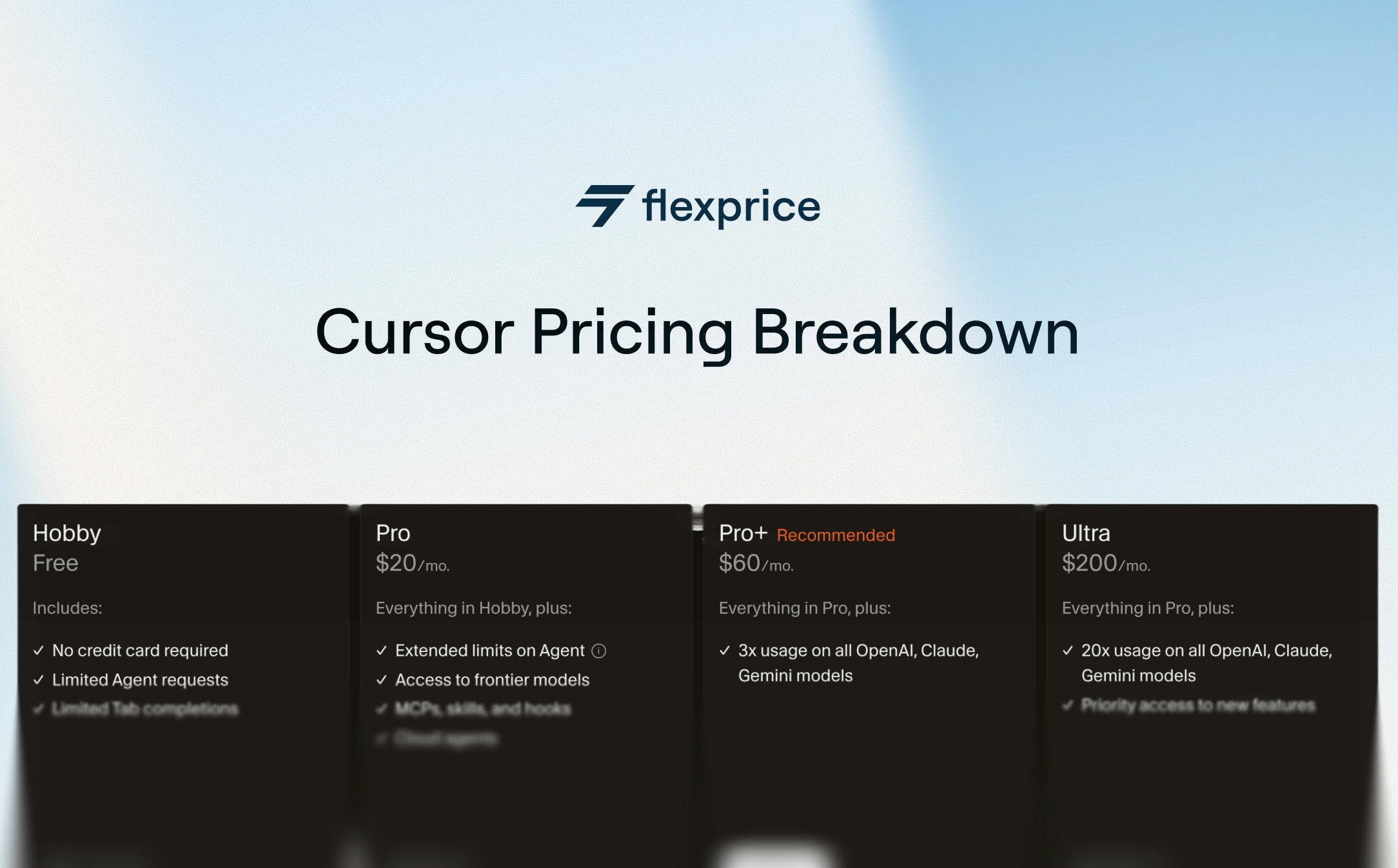
Cursor costs nothing on Hobby, $20 a month on Pro, $60 on Pro Plus, and $200 on Ultra, with Teams seats at $40 or $120 per user and Enterprise priced on request. Every paid plan includes a set dollar amount of model usage, and once you spend it, Cursor bills the overage in arrears.
That second part is where bills get surprising. Cursor changed how it charges three times in 2026 alone, so most plan tables on the web are describing a product that no longer exists.
Key takeaways
Pro buys $20 of third-party model usage, Pro Plus buys $70, and Ultra buys $400. Plan fee and included usage match only on Pro.
Cursor runs two usage pools. One covers its own models (Grok 4.6, Grok 4.5, Composer 2.5) generously. The other covers third-party models like Claude and GPT at API rates, and it's the one that empties.
Teams split into two seat types on June 1, 2026. Standard costs $40 per user monthly, Premium costs $120 and carries 5x the usage at 3x the price. You can mix both on one team.
Bugbot stopped being a $40 seat subscription in May 2026. It bills per review run at roughly $1.00 to $1.50, and runs on every commit push rather than once per pull request.
Annual billing takes 20% off every paid tier, which drops Pro to $16 a month and Teams Standard to $32 per seat.
By Cursor's own guidance, daily Tab users stay within $20, daily Agent users spend $60 to $100 a month, and anyone running multiple agents should expect $200 or more.
How much Cursor costs in 2026
Cursor sells four individual plans, two Teams seat types, and a custom Enterprise tier, plus a regional plan for India. Here's every current price alongside what each one actually includes.
Plan
Monthly
Annual
Included third-party usage
Cursor models pool
Hobby
Free
Free
None
Limited
Start (India only)
₹649
Not offered
$0
Generous
Pro
$20
$16/mo
$20
Generous
Pro Plus
$60
$48/mo
$70
Generous
Ultra
$200
$160/mo
$400
Generous
Teams Standard
$40/user
$32/user
Standard allowance
Generous
Teams Premium
$120/user
$96/user
5x Standard
Generous
Enterprise
Custom
Custom
Pooled
Pooled
I'd read the middle column and the fourth column together, because that relationship is the whole pricing model.
On Pro you pay $20 and get $20 of third-party usage, so the subscription is effectively a pass-through. On Pro Plus you pay $60 and get $70.
On Ultra you pay $200 and get $400. Cursor is discounting the usage as you move up, which is the opposite of how most SaaS tiers work, and it's genuinely a good deal if you're the kind of developer who burns through frontier models.
Annual billing takes 20% off across paid tiers. Cursor's Teams figures make the discount easy to verify: Standard drops from $40 to $32 a seat, Premium from $120 to $96.
One catch worth knowing before you commit. You can upgrade to yearly any time from the billing dashboard, but you can't switch back to monthly mid-plan, only schedule the change for the end of the yearly period.
Cursor Start, the India-only plan
Cursor launched, Start on July 28, 2026 at ₹649 per month, tax inclusive, billed in INR through UPI, credit card, or debit card.
It sits between Free and Pro and covers the Cursor models pool, so you can run Grok 4.6, Grok 4.5, and Composer 2.5 for daily work, along with Cloud Agents, Cursor for iOS, plugins, MCP servers, hooks, and skills.
Start leaves out a lot: no third-party model pool, no on-demand usage, no Bugbot, no Auto, no Automations, and no Cursor SDK. All three models run in non-fast mode at a fixed medium effort level, and you can't change either.
The reason this plan exists is worth noting. Cursor's India user base tripled in a year to more than 3M developers, making it the company's third largest market and, by Cursor's own account, the one with the most power users anywhere. Pricing in local currency with local payment rails is what that kind of growth eventually forces.
Student pricing
Cursor has no standing student discount, whatever older guides tell you. Its students page says only that "anyone can get started with Cursor for free" and points students toward promotions at on-campus and online events.
So the student answer is the Hobby plan everyone else gets, plus whatever an event happens to offer.
Worth knowing if you're choosing between tools on a student budget: GitHub Copilot does run a verified student plan. Cursor doesn't match it right now.
How Cursor's usage-based pricing works
Every paid plan gives you a dollar balance of model usage that resets with your billing cycle, and each request draws down that balance at the model's own rate.
When the balance hits zero, Cursor either stops or keeps going on on-demand billing, depending on how you've set it up.
Cursor moved to this model in June 2025, replacing a 500-request monthly cap with usage-based billing pegged to model API costs. The rollout went badly.
Customers hit unexpected charges, and the promise of unlimited usage turned out to apply only to Auto rather than every model. CEO Michael Truell apologised publicly on July 4, 2025, called the communication unclear, and offered refunds for unexpected usage between June 16 and July 4.
You can still find the Reddit thread where users compared billing screenshots. The lesson stuck: Cursor now ships usage meters and spend alerts alongside every pricing change.
The two usage pools
Cursor keeps two separate pools of included usage, and knowing which one you're spending is the difference between a $20 month and a $200 one.
The Cursor models pool covers Cursor's own models: Grok 4.6, Grok 4.5, and Composer 2.5. Every paid plan gets generous included usage here, and most developers never exhaust it.
The other models pool covers third-party models like Claude, GPT, and Gemini, charged at each model's API price. This is the pool carrying the $20, $70, and $400 figures from the table above, and it's the one that runs out.
What Cursor calls an included amount works the way credit wallets work everywhere else: a balance that resets on a cycle, drains at per-item rates, and falls through to on-demand billing when it empties.
Both pools show up in your editor settings and on the usage dashboard, split so you can see which one you're draining.
When the third-party pool empties, you have two choices. Switch to Cursor's own models and keep working on the pool you haven't touched, or turn on on-demand usage and pay at the same API rates, billed in arrears.
Cursor doesn't downgrade request quality or speed on on-demand usage, which is a fair way to handle it.
Cursor Router and what each mode costs
Cursor Router replaced the old Auto mode on July 22, 2026, and split it into three modes that bill very differently.
Auto Cost works like the old Auto: Cursor picks a cost-efficient model and charges a flat rate no matter which one runs. That rate is $1.25 per million input tokens, $1.25 per million cache write, $0.25 per million cache read, and $6 per million output.
Auto Balance and Auto Intelligence let Cursor reach for stronger models, and they bill at whatever model actually ran. Route a request to Opus 5 and you pay Opus 5 prices.
Cursor built Router for teams and enterprises first, and individual plans follow a few months later.
Admins control the rollout: they can enable it per team or group, pick which modes members may select, set the default, and allow or block specific models. It works across the Agents window, the editor, the CLI, the Cursor SDK, and the iOS app.
The savings Cursor claims are worth the attention. It trained the router on 600k+ live requests, and reports 30% to 50% lower cost during early access with dozens of enterprises, rising to 60% savings in A/B tests across millions of live requests. The premise is that roughly 60% of developers pick one model as a daily driver and then run routine work at frontier prices.
One correction, because plenty of guides still repeat the old rule. Auto genuinely was unlimited: when Cursor moved to usage pricing in June 2025 it offered unlimited usage of models under Auto, and that's where the claim comes from. Cursor Router ended it. Auto Cost now has a published rate card, so it stays cheap and it's still the right default for routine work, but it draws down your usage like everything else.
Current model rates
All rates below are per million tokens. Cursor's own models sit in the first table and third-party models in the second.
Cursor model
Input
Cache read
Output
Grok 4.6
$2
$0.50
$6
Grok 4.6 (Fast)
$4
$1
$12
Grok 4.5
$2
$0.50
$6
Grok 4.5 (Fast)
$4
$1
$12
Composer 2.5
$0.50
$0.20
$2.50
Composer 2.5 (Fast)
$3
$0.50
$15
Third-party model
Input
Cache write
Cache read
Output
Claude Fable 5
$10
$12.50
$1
$50
Claude Opus 5
$5
$6.25
$0.50
$25
Claude Sonnet 5
$2
$2.50
$0.20
$10
Gemini 3.1 Pro
$2
n/a
$0.20
$12
Gemini 3.7 Flash
$0.75
n/a
$0.075
$3.50
GPT-5.6 Luna
$0.20
$0.25
$0.02
$1.20
GPT-5.6 Sol
$5
$6.25
$0.50
$30
GPT-5.6 Terra
$2
$2.50
$0.20
$12
Run the same task through Composer 2.5 at $0.50 input and Claude Fable 5 at $10 input and you've made a twentyfold difference to what it costs. Model choice moves your bill more than your plan does, which is exactly why how to meter token usage matters to anyone charging for AI work rather than just buying it.
What each plan actually limits
Cursor limits three things: how many Agent requests you can run, how much third-party model usage you get in dollars, and which features you can reach at all.
Agent limits scale by tier. Pro sets the baseline, Pro Plus gives you 3x those limits, and Ultra gives you 20x.
Teams Premium gives 5x whatever a Standard seat gets. Notice these multipliers describe Agent limits, not the dollar pools, which is a distinction Cursor's own marketing page blurs and most third-party guides get wrong.
The dollar ceiling is the third-party pool: $20 on Pro, $70 on Pro Plus, $400 on Ultra. The Cursor models pool has no published dollar figure and Cursor describes it only as generous.
For Teams, Cursor expects a Premium seat's first-party pool to cover a full month of heavy agent usage for 99% of users.
Feature limits bite hardest on Start and Hobby. Hobby caps Agent requests and gives you Composer access.
Start blocks the third-party pool, on-demand usage, Bugbot, Auto, Automations, and the Cursor SDK, and locks its three models to non-fast mode at fixed medium effort.
How to choose the right Cursor plan
Pick your plan from how much you actually spend, not from the feature list, because the features barely change between Pro, Pro Plus, and Ultra. Cursor publishes its own spend benchmarks and they're the most useful thing on its site:
Daily Tab users always stay within $20
Limited Agent users often stay within the included $20
Daily Agent users typically run $60 to $100 a month in total usage
Power users running multiple agents or automations often pass $200
Map those straight onto plans. If you mostly autocomplete, Pro at $20 covers you and you'll rarely touch the ceiling. If you run agents daily, Pro Plus at $60 buys $70 of usage and stops most on-demand charges. Ultra earns its $200 once your monthly usage clears about $210, because below that Pro Plus plus overages still comes out cheaper.
We work the break-even out the same way every time, and it's simple enough to do in your head. Once your Pro overages run $20 to $40 a month, Pro Plus is cheaper. Once Pro Plus overages pass $140, Ultra is cheaper. Cursor's own recommendation lines up: it suggests Pro Plus for daily agent users and Ultra for agent power users.
For teams, mix seat types instead of upgrading everyone. A Premium seat costs 3x a Standard seat and carries 5x the usage, so moving your two heaviest users up beats moving the whole team up.
How Cursor compares on price
The whole category has converged on $20 with a credit pool attached, so Cursor's sticker price tells you almost nothing on its own.
Tool
Entry paid price
What the fee includes
GitHub Copilot Pro
$10/mo
$15 of monthly credits
Cursor Pro
$20/mo
$20 of third-party model usage
Replit Core
$20/mo
$20 of monthly credits
Windsurf Pro
$20/mo
Increased quotas, extra usage at API pricing
Copilot is the outlier, and even there the $10 buys $15 of credits. Everyone else charges $20 and hands back roughly $20 of usage, which tells you the subscription isn't really the product.
The usage layer is, and that holds for Replit AI pricing and every other tool on this list. So when Cursor feels expensive, the $20 line item isn't what did it.
One note if you're comparing these yourself. Windsurf now sits under Cognition's Devin brand and windsurf.com redirects to devin.ai, so older comparison tables listing it at $15 are describing a product that's been repriced and rebranded.
Hidden costs and upgrade traps to watch out for
Cursor's pricing page doesn't show every way you can spend more than you planned. These are the ones that catch people.
The Cursor Token Rate
On Teams and Enterprise, every third-party model request carries an extra $0.25 per million tokens on top of the model's API price.
It applies to included usage, on-demand usage, and bring-your-own-key usage alike. Cursor's own models and
Auto Cost are exempt
That last detail is the one that stings, because bringing your own API key no longer means paying Cursor nothing for the tokens.
Regional data residency. Opting in adds a 10% uplift on model pricing for eligible models. If compliance requires it, budget for it.
Bugbot billing per run
Cursor removed Bugbot's $40 per seat fee on May 11, 2026 and moved it to pure usage billing, effective at each customer's first renewal after June 8, 2026. Teams bill Bugbot from on-demand spend and individuals bill it from included usage.
An average run costs $1.00 to $1.50 depending on the size and complexity of the pull request. The word doing the work there is run, not pull request.
Cursor's docs are explicit that Bugbot reviews the full PR diff on every push by default, so an iterative branch bills several times over.
Two things soften that: a newer commit cancels a review still in flight, and Incremental Review (covered below) cuts each run down to the changes since the last one.
You can also set effort levels: default resolves 80% of the bugs it flags by merge time, and high effort finds 35% more bugs while holding that same 80% resolution rate.
I'll say the quiet part here. This is the second time in a year Cursor has moved a product from predictable seats to variable usage.
It handled this one better, announcing it in advance and delaying the switch to each customer's renewal, and the complaints on its forum are about the model rather than the messaging.
Per-run billing charges the developer who pushes in small increments more than the one who lands a branch in a single commit, which is backwards from how most teams want people to work.
Background Agent
These bill separately at the model's API rate with no fixed monthly cap. Set your own spend limit before you need one. Cursor rebuilt spend alerting in June 2026, so admins can now set dollar thresholds and route the alerts to Slack or email before the bill arrives.
Bring-your-own-key gaps
You can add your own key for OpenAI, Anthropic, Google, Azure OpenAI, or AWS Bedrock and send unlimited messages at your own cost.
Two catches
Custom keys only work with chat models, so Tab completion keeps running on Cursor's built-in models no matter what key you paste in.
And Cursor's Zero Data Retention policy stops applying the moment you use your own key: your data then follows your provider's privacy policy instead. If your team bought Cursor partly for ZDR, bringing your own key quietly undoes it.
The Cursor Token Rate above still applies to BYOK usage on Teams and Enterprise.
Upgrade pressure
Hit your included amount early enough times and Pro Plus, Ultra, or a Premium seat starts looking inevitable.
The dashboard now shows how close you are to each limit and even recommends seat types based on how you work, which is a real improvement on 2025 and also a very effective upsell surface.
How to cut your Cursor bill
Cutting your Cursor bill comes down to which model runs, and in my experience almost nothing else moves the number. Six things worth doing, in rough order of how much they save.
Default to Composer 2.5 and Auto Cost. Composer runs $0.50 per million input tokens against Claude Fable 5 at $10. Cursor built the first-party pool to be generous precisely so you'd use it. Reach for frontier models when a task genuinely needs multi-file reasoning.
On Teams, remember the token rate. Third-party models cost their API price plus $0.25 per million tokens on Teams and Enterprise. First-party models skip it entirely, which widens the gap further than the rate cards suggest.
Mix Standard and Premium seats. Premium is 5x usage at 3x cost, so it only pays off for genuinely heavy users. Check the dashboard's seat recommendations rather than guessing.
Turn on Incremental Review for Bugbot. By default every push triggers a review of the entire PR diff. Incremental Review, in Bugbot Automations, narrows each run to the changes since the last review, which is the difference between paying for one diff repeatedly and paying for it once.
Set spend alerts and a spend limit. Configure dollar thresholds and send them to Slack or email. A limit you set in advance is the only thing standing between an experiment and a four-figure invoice.
Watch the pool split, not the total. The dashboard separates first-party from third-party usage. The total tells you nothing useful, because those two numbers behave completely differently.
Track your usage for a month before changing plans. The benchmarks above will tell you which tier you belong to faster than any amount of guessing about your own habits.
How to clone Cursor’s pricing with Flexprice’s Prompt to Plan Feature
If Cursor's pricing model resonates with how you want to charge for your own product, you don't have to build the billing infrastructure from scratch. Flexprice's MCP server lets you replicate this exact structure, fixed plans, usage credits, and pay-as-you-go overages, without writing billing logic yourself. Let's see how this works:
Step 1:
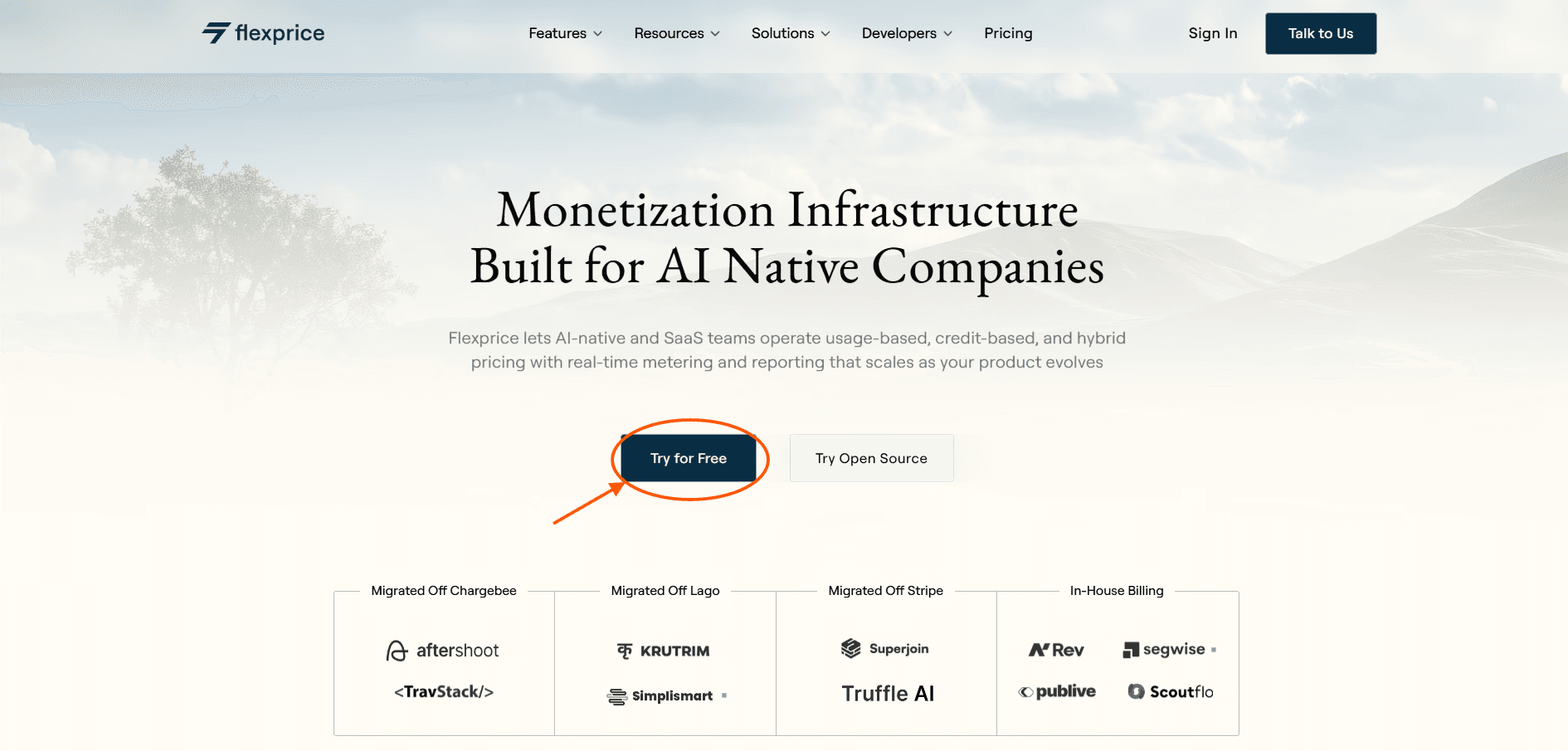
First, visit our website Flexprice.io, then click on Try For Free button to sign up
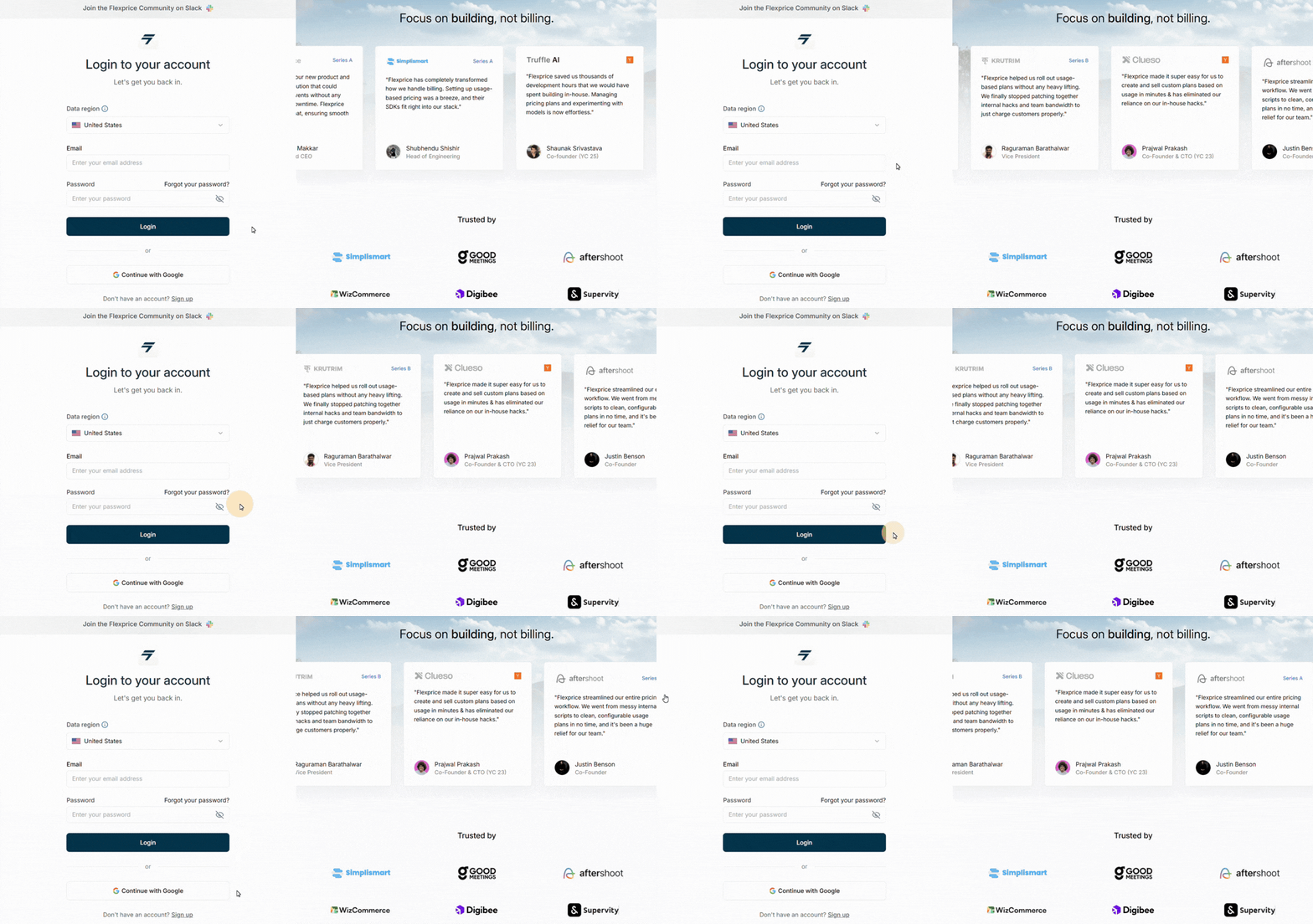
After that, a new window will open where you can fill in your credentials to get started with us
Step 2:
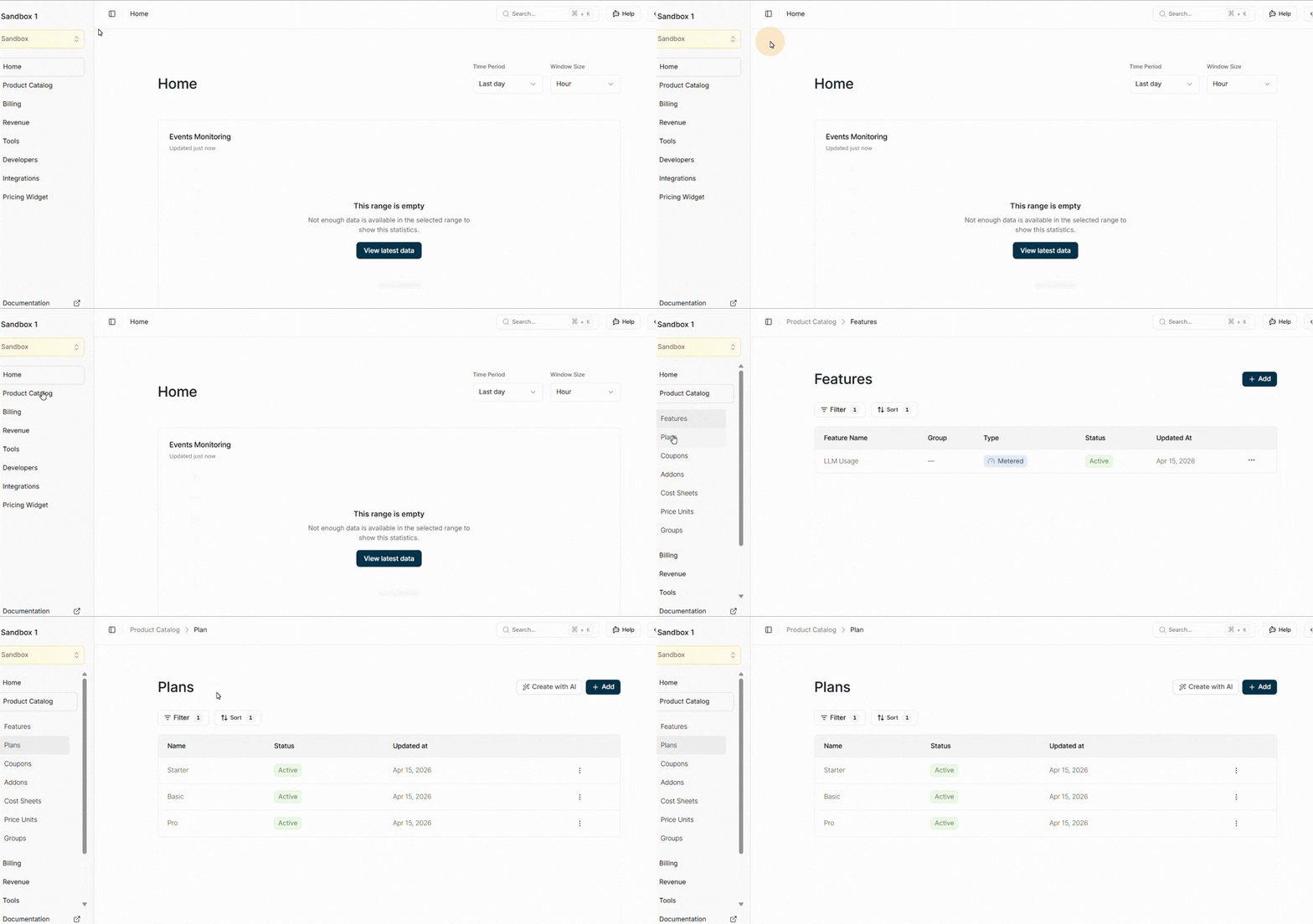
After you're signed up, the Flexprice dashboard will open up. Now, navigate to the product catalog, there you can see plans. Click on that
Step 3:
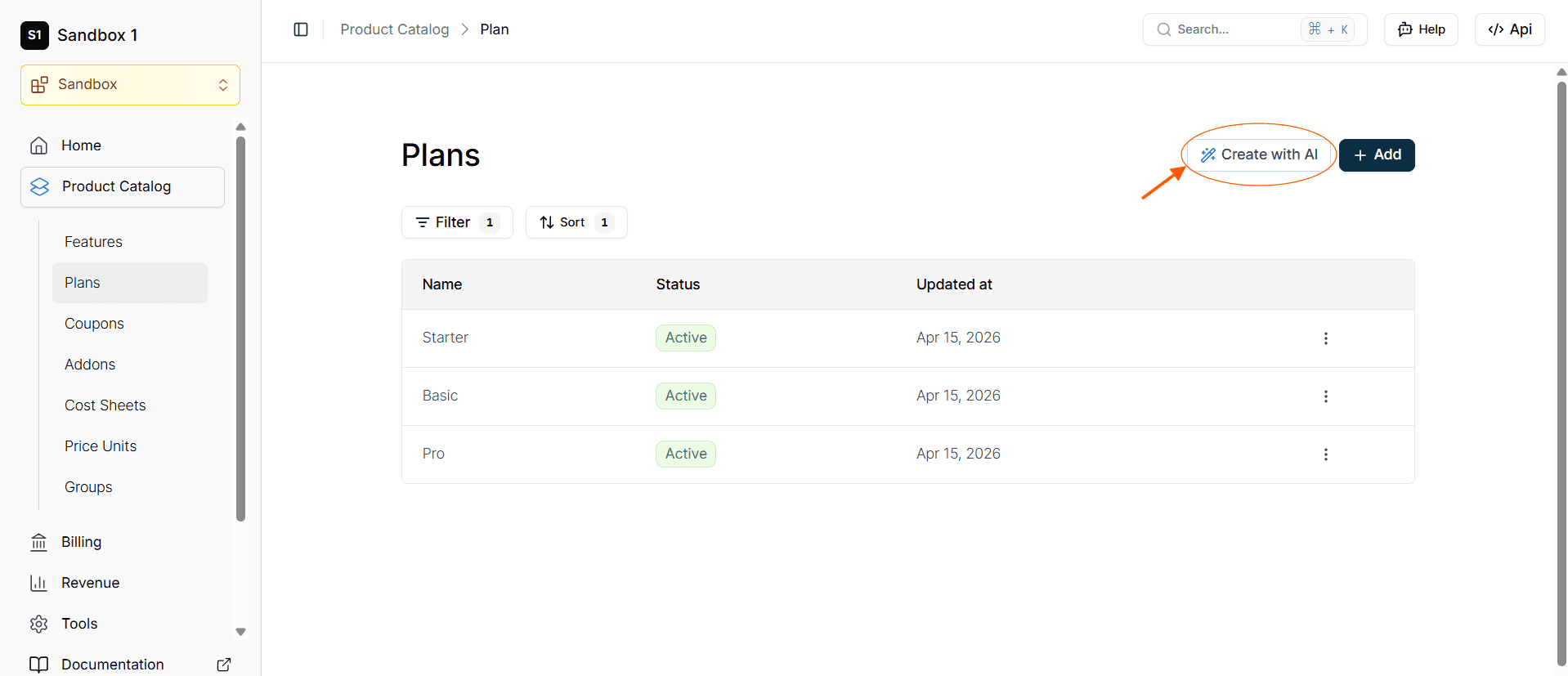
Click on Product Catalog from the left side of the nav bar and then click on Plans.
Step 04:
On the top right corner you can see a button CREATE WITH AI, so click on that.
Step 05:
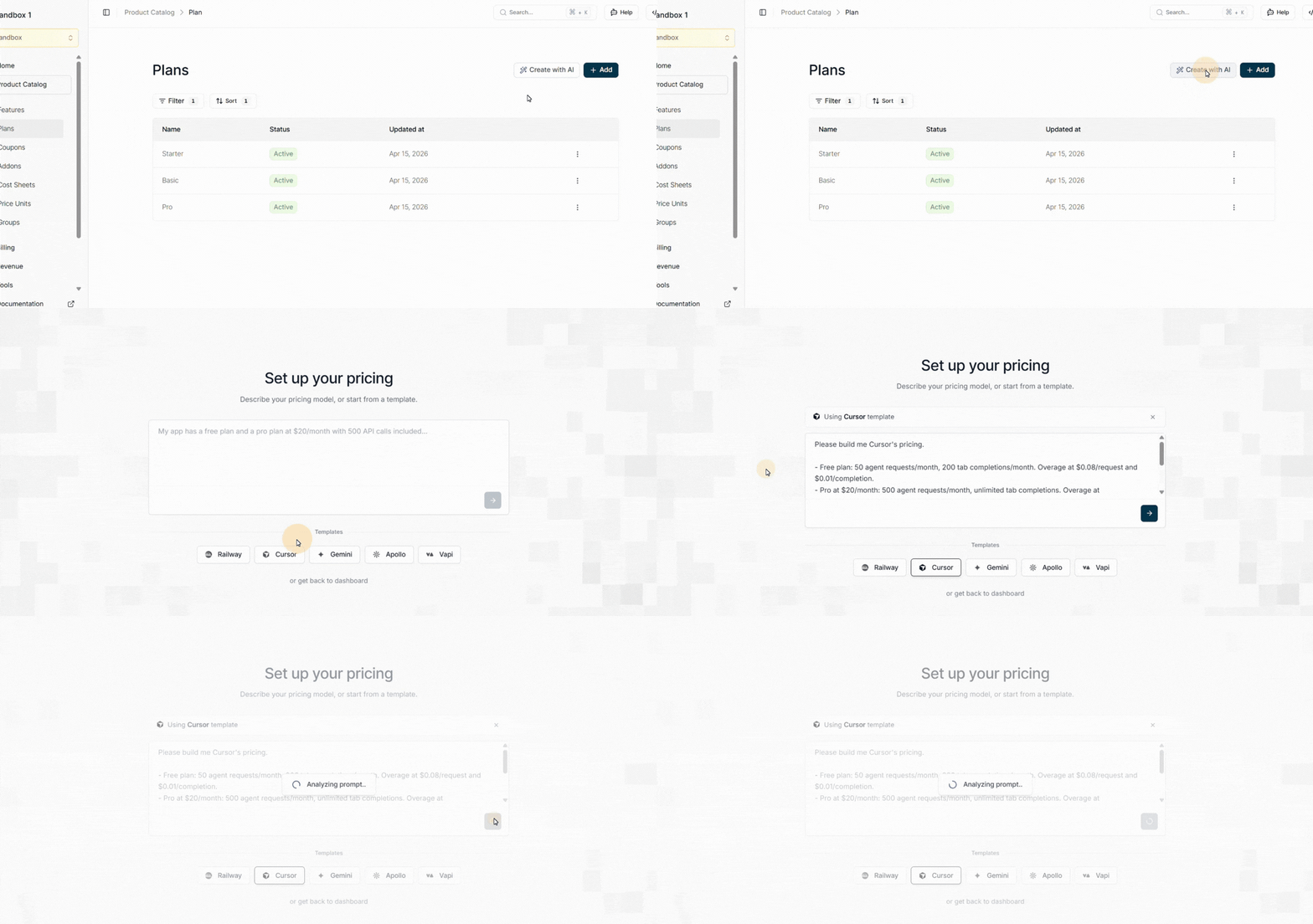
Once you click on that you can see there are many templates; you just need to select the Cursor, and then the prompt for Cursor pricing will appear in the chat. Then click enter and the analyzing will begin.
Step 06:
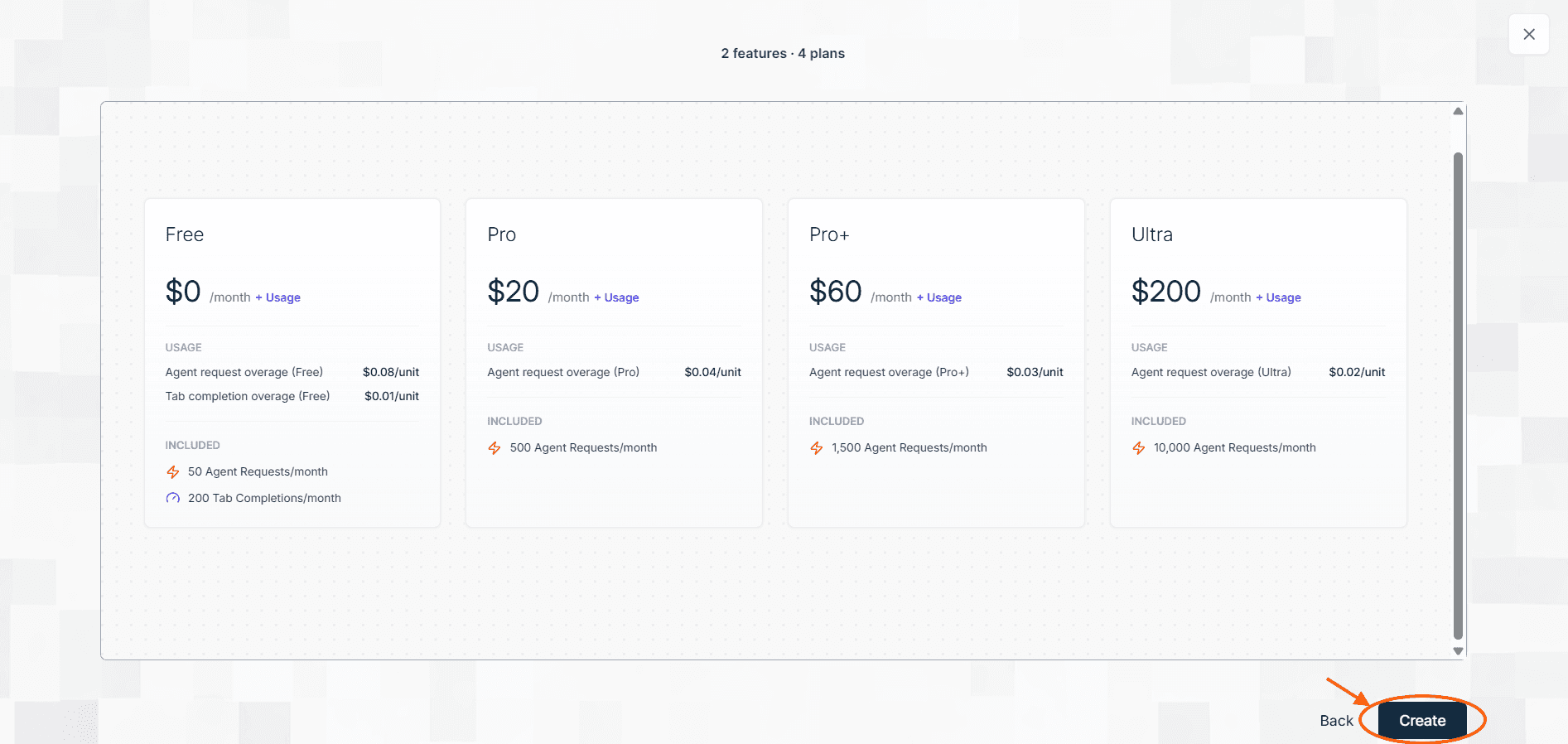
After analyzing is over a new window with all the features and paln will come,now click on create
Step 07:
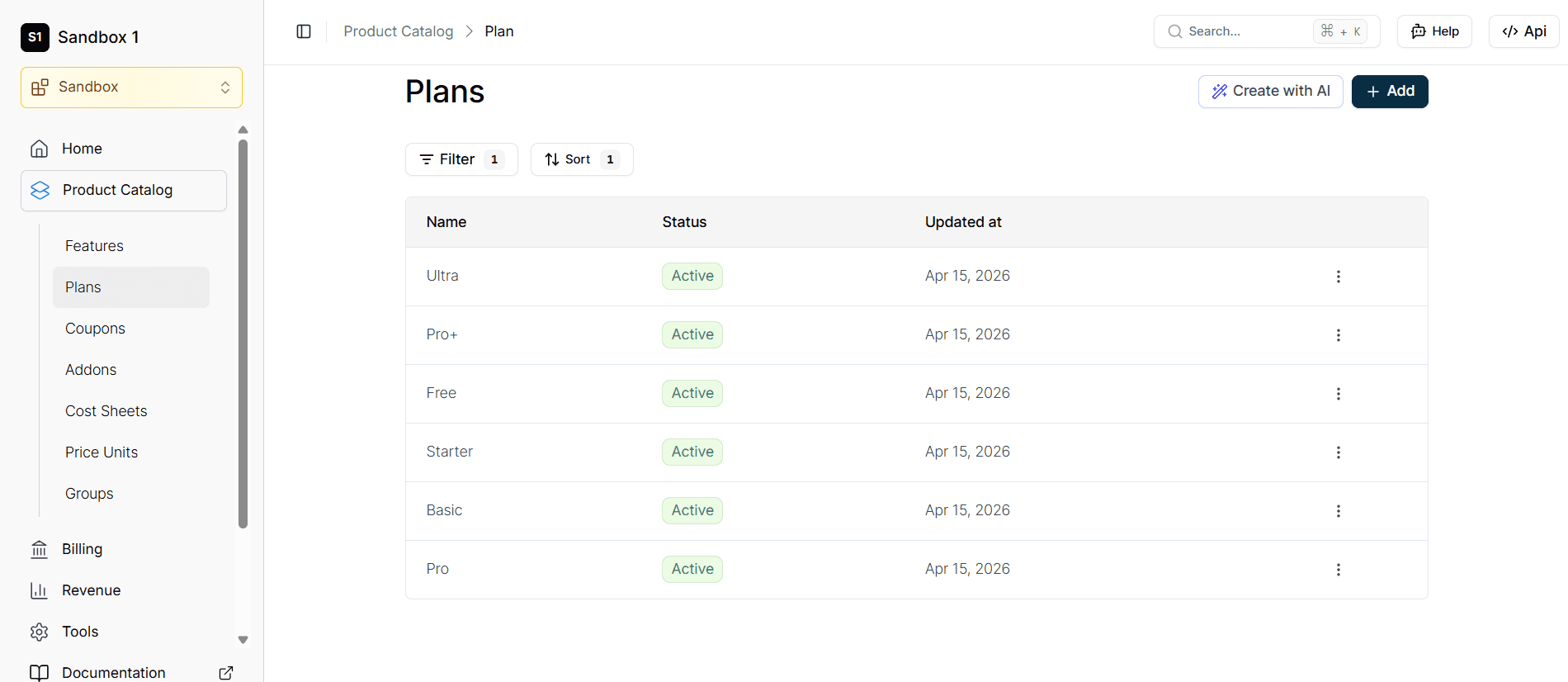
After this process is completed you can see all the plans and features have been created according to Cursor pricing.
How to clone Cursor’s pricing with Flexprice’s MCP server
Step 01:
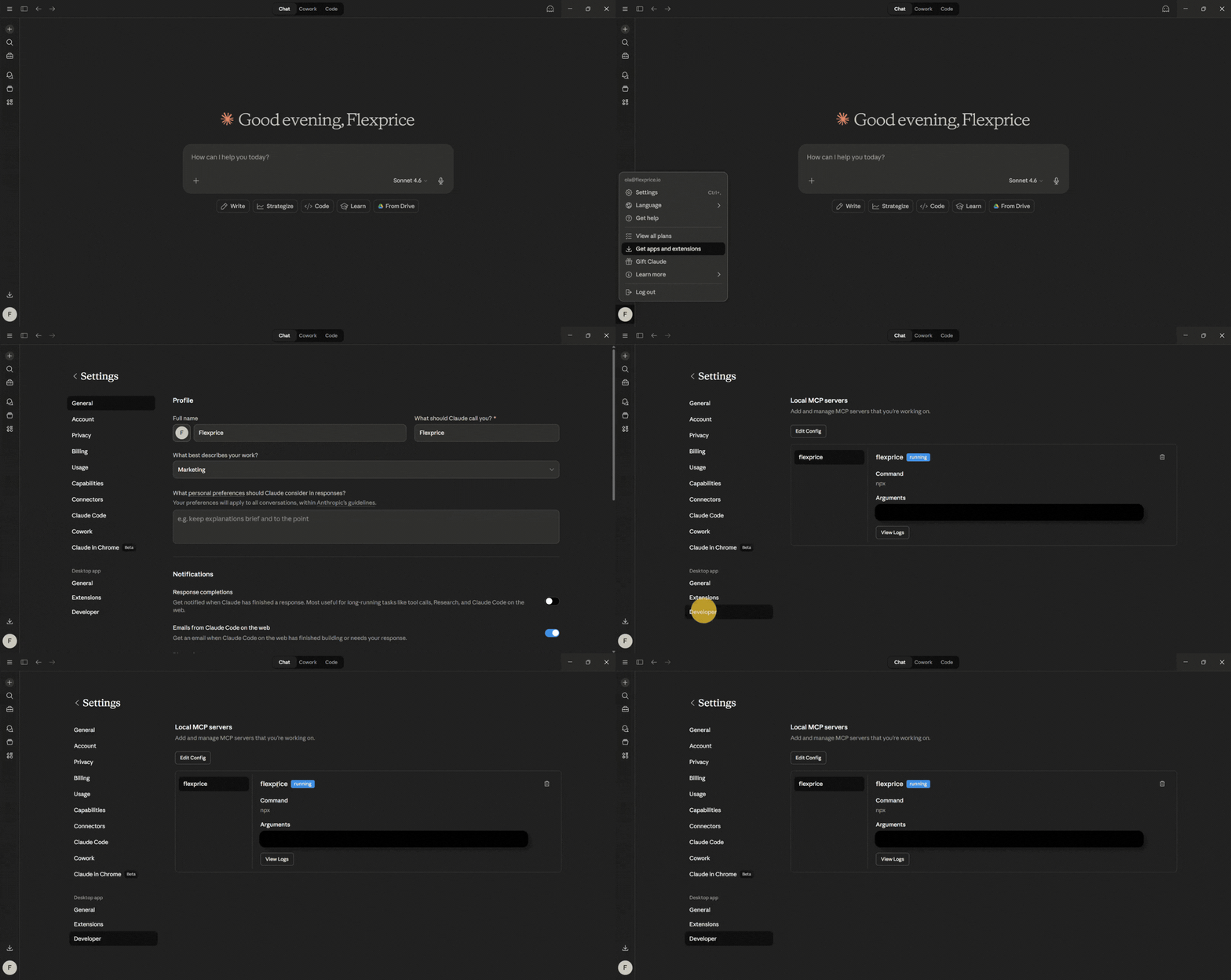
Ensure that you are successfully set up with Flexprice's MCP server. You can check it by going into settings, then into developer options. There, you can see the Flexprice MCP server status
Step 02:
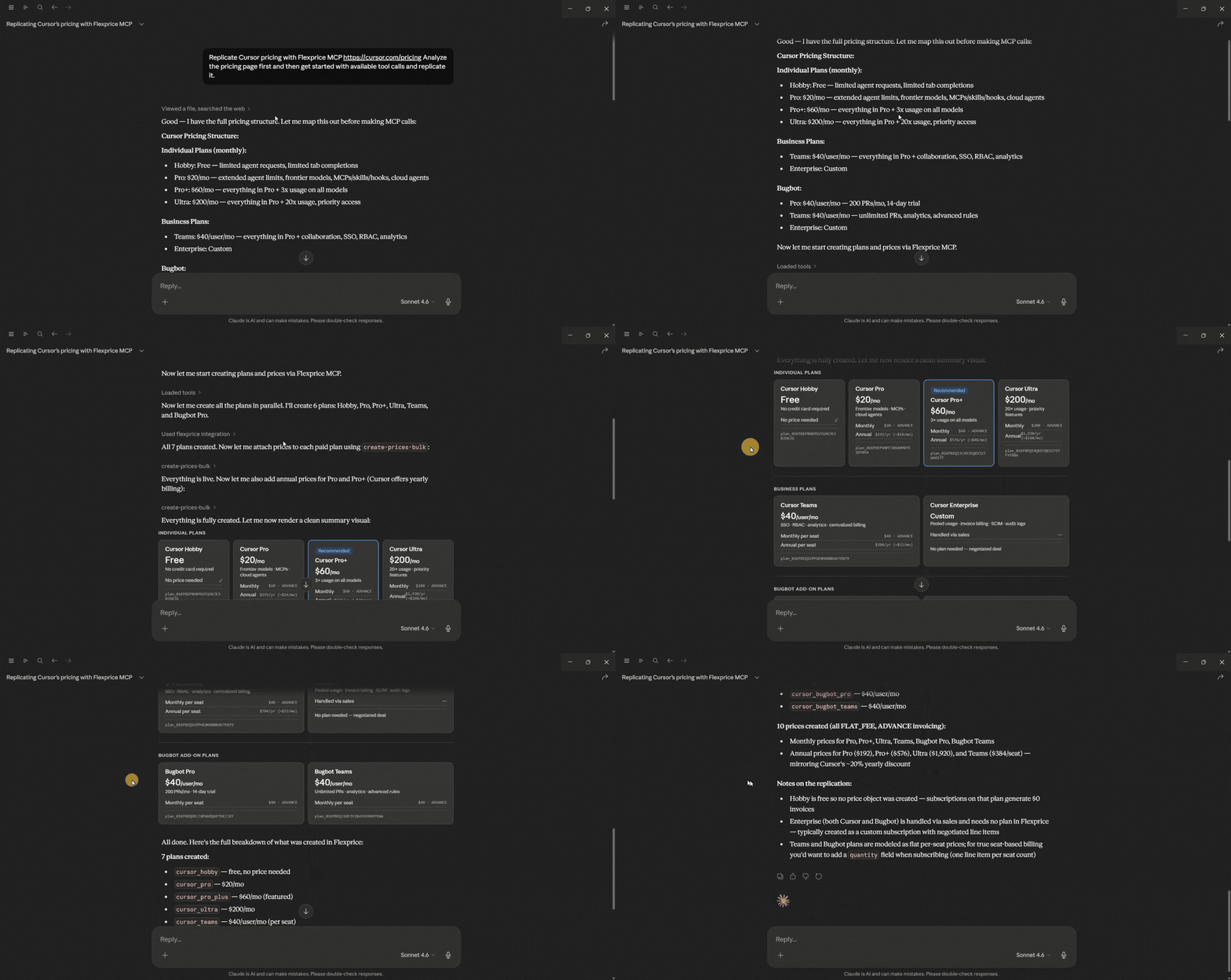
Access Claude or any other AI tool that integrates with the MCP server.Then provide a single prompt asking the AI tool to analyze Cursor’s pricing page and replicate its entire structure through the Flexprice MCP. In the prompt, include Cursor’s pricing link.
Step 03:
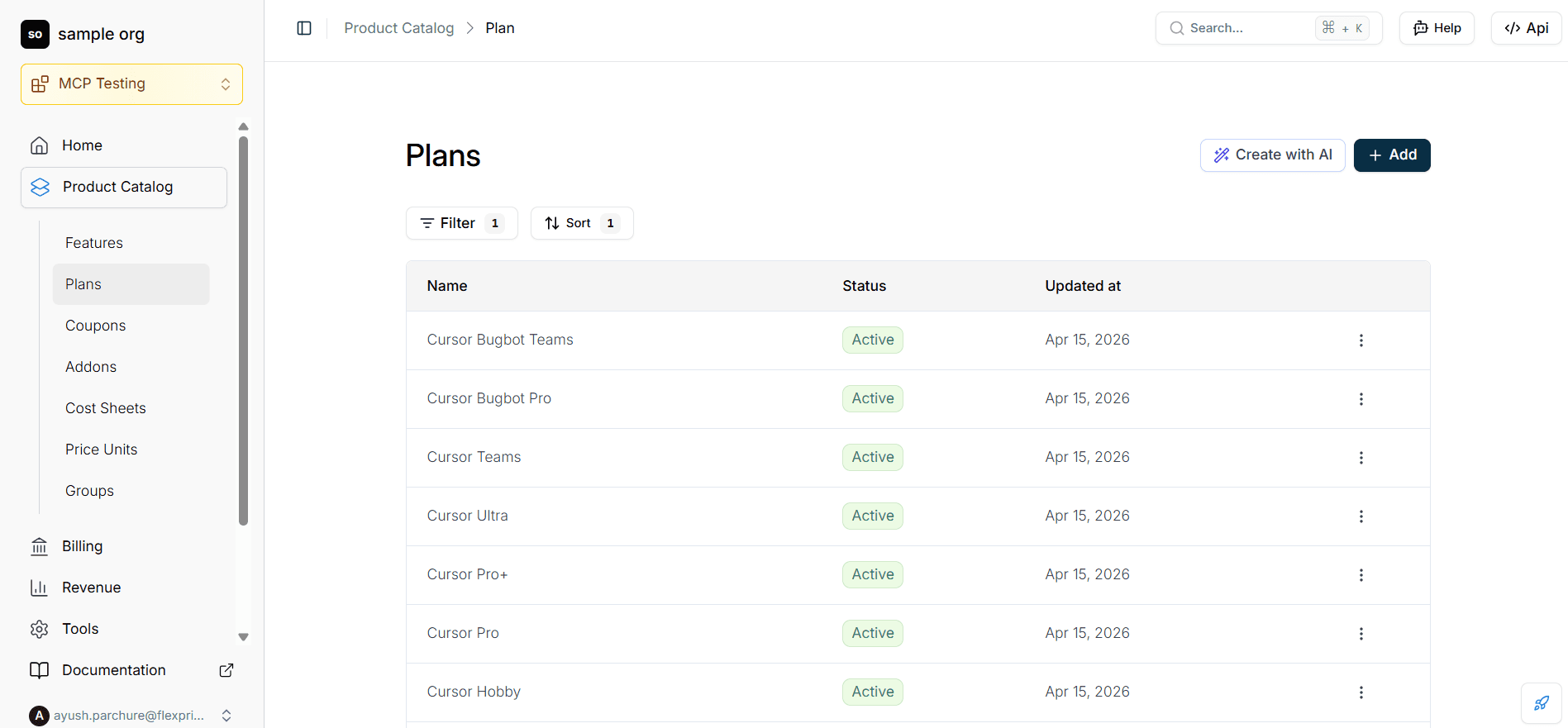
Navigate to your Flexprice dashboard to review the newly created assets. You will find that the AI has used the context from Cursor’s pricing page to automatically pre-fill and create plans.
And that's all it takes to replicate Cursor's pricing structure using Flexprice’s MCP server. Both methods get you to the same result, the only difference is how hands-on you want to be.
The AI template is faster if you want a one-click starting point, while the other approach gives you more control through your own AI assistant.
Once everything is set up in your dashboard, you can adjust the plan names, credit limits, and overage rates to better fit your product. The hard part is already done, now your pricing just needs to learn your product's name.
Balancing flexibility and predictability in Cursor's pricing
Cursor's tiered model offers flexibility; you can use any supported model, scale context size, and pick a tier that matches your usage intensity. With six plan options across individual and business tiers, plus a separate Bugbot product, there's a configuration for most workflows.
The trade-off is predictability. If you don't track which models you use or how often you're in MAX mode, on-demand costs can jump unexpectedly. The June 2025 rollout showed that even well-intentioned changes can frustrate users if the rules aren't clear and the tools to monitor usage aren't in place.
For most developers, the best approach is to start small, track your usage for a month, and only move up when you know exactly why you need the extra headroom. Flexibility is valuable, but only if you can see, predict, and justify the cost.
Frequently Asked Questions
Frequently Asked Questions
How does Cursor's usage-based pricing work, and how is it different from request-based billing?
What is Cursor's on-demand pricing, and how can I avoid unexpected overage charges?
Which Cursor plan is best for developers who use AI coding tools heavily every day?
How does Cursor's pricing compare to other pay-as-you-go AI coding tools?
Can I replicate Cursor's usage-based pricing model for my own SaaS or AI product?
Aanchal Parmar
Aanchal Parmar
Aanchal Parmar heads content marketing at Flexprice.io. She’s been in the content for seven years across SaaS, Web3, and now AI infra. When she’s not writing about monetization, she’s either signing up for a new dance class or testing a recipe that’s definitely too ambitious for a weeknight.
Aanchal Parmar heads content marketing at Flexprice.io. She’s been in the content for seven years across SaaS, Web3, and now AI infra. When she’s not writing about monetization, she’s either signing up for a new dance class or testing a recipe that’s definitely too ambitious for a weeknight.